
Cango logo
Smartphone displaying a colorful casino game with orange neon glow on dark surface, blurred night city bokeh background

Cango Android App: installing on Android in three steps

Updated: 10 November 2026

A typical mistake when looking for the cango android app is opening Google Play, typing the brand name and installing a copycat pokie that has nothing to do with your real-money account. The casino does not publish a store app. It uses a Progressive Web App that you add from your mobile browser. Open the site in Chrome, open the browser menu and tap the install option, and the real icon is on your home screen in under thirty seconds.

Cango android app: steps in brief

The whole install happens inside Chrome, with no file download and no change to Android security settings. Once added, the web app runs in its own window, remembers your session and gives you the lobby, the A$ cashier and the 24/7 live chat without typing an address. The table shows each step and what you should see on screen.

StepWhereWhat you see
1. Open ChromeYour Android phoneThe casino lobby in a normal browser tab
2. Open the menuTop-right corner of ChromeThe three-dot icon next to the address bar
3. Select installInside the menuInstall app or Add to Home screen
4. ConfirmCentre of the screenA pop-up asking you to confirm the install
5. Open the iconHome screenThe new icon next to your other apps
6. Sign inInside the appThe login screen with no address bar at the top

The whole route works on any recent Android phone with Chrome, from budget models to tablets. You need an internet connection only while you play, and the icon takes up a few megabytes rather than the hundreds a store game would use. Updates arrive automatically the next time you open it, so there is nothing to download later.

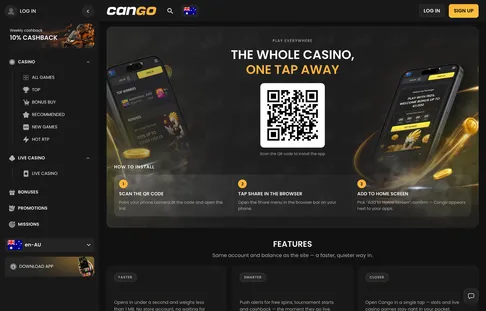
The casino’s install page carries the Download Android button, which leads to the same Chrome install rather than to Google Play.

Cango mobile app install page with a QR code to add the casino to your home screen

Cango android app: fixes

If the icon does not appear, one of these is usually the cause. Work down the list.

  • Samsung Internet or Firefox: menu names differ. In Samsung Internet, open the menu in the bottom bar, choose Add page to and pick Home screen. In Firefox, open the three-dot menu and select Install. If neither shows a proper install prompt, switch to Chrome.
  • Launcher permissions: some phones lock the home screen layout. Open Settings, then Home screen, and switch off Lock Home screen layout. Also check that Chrome may add shortcuts.
  • Low storage: the web app is tiny, but Android can refuse new icons when storage is almost full. Clear the browser cache or remove old videos and try again.
  • The icon opens as a normal tab: Chrome saved a plain bookmark instead of the web app. Delete the icon, clear the site data in Chrome, reload the lobby, wait a few seconds and choose Install app again.
  • APK files: never install APK files from forums or file-sharing pages that claim to be the casino. They are unsafe, and the genuine setup only ever comes through the browser menu.

Cango android app: the request route

In Chrome, the install is a short request from the browser to Android. Follow this route to get the proper prompt.

  1. Open Chrome and make sure you are not in an Incognito tab, which blocks web app installs.
  2. Load the casino page and let it finish loading.
  3. Tap the three-dot menu in the upper right corner.
  4. Tap Install app; on older Android versions the line reads Add to Home screen.
  5. Confirm with Install and go back to your home screen to find the icon.

Open the icon and sign in with your email and password or with Google. Keep any VPN off, because VPNs are banned and can block access. If you are signing up from the phone, choose AUD, as the currency cannot be changed later.

The cashier in the app takes Visa, Mastercard and crypto such as BTC, ETH, USDT and LTC from A$15. A first deposit of at least A$45 with WP1 brings 150% up to A$1,500 plus 300 free spins over three days. You can compare every current Cango bonus once the icon is running and pick the one that fits your first deposit. Missions also appear after sign-in, with daily and weekly tasks that pay spins or bonus money.

To keep the app tidy, sign out on shared tablets and use the phone’s own screen lock on your personal device. If you ever remove the icon, nothing happens to your account or balance; simply repeat the Chrome route to add it again. The same is true after a factory reset or when you move to a new phone, since everything is stored with your account rather than on the device.

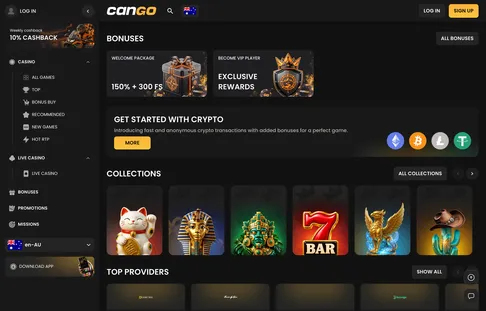
Opened from the home screen icon, the lobby runs full screen on Android with the menu, cashier and promotions in reach.

Cango home page with bonus cards, crypto deposit banner and themed pokie collections

Cango android app: what players ask most

  • Is there a Cango app on the Google Play Store?

    No, the Cango app is not in Google Play. It is a Progressive Web App that you install from Chrome to your home screen.

  • How do I install the Cango app on my Android device?

    Open the casino site in Chrome and tap the three-dot menu in the top right corner. Choose Install app or Add to Home screen and confirm.

  • Are the same games available in the Android app?

    Yes, the app shows the same pokies, live tables and Bonus Buy titles as the desktop lobby. Deposits, cashouts and bonus activation all work the same way.

  • Can I claim the welcome bonus while using the mobile app?

    Yes, enter WP1 with a first deposit of at least A$45 to get 150% up to A$1,500 and 300 free spins. The terms are the same as on desktop.

  • Do I need a separate account for mobile play?

    No, use the same login on mobile and desktop. The casino allows one account per person, and VPN access is not permitted.