

Cango logo
Smartphone displaying a colorful casino game with orange neon glow on dark surface, blurred night city bokeh background

Cango App: putting the casino on your home screen without the app store

Updated: 10 November 2026

Many players in Australia open the App Store or Google Play, type the casino name, and assume there is no mobile version when nothing comes up. Worse, some install a game with a similar name that has no link to their real money account. The fix is to skip the stores and open your mobile browser instead. Cango runs as a Progressive Web App, or PWA, which installs from Safari on an iPhone or Chrome on an Android phone in under a minute.

Cango casino app: the install overview

Getting the cango casino app onto your phone needs no large download and no store approval. The site uses your existing browser to place an icon next to your other apps. The Download iOS and Download Android buttons on the casino site lead to this browser install rather than to a store page. Once the icon is on your home screen, it opens a full-screen lobby without the address bar, with your A$ balance, the cashier and every game category in one place.

DeviceStepsWhat you need
iPhone SafariOpen the site in Safari, tap Share, choose Add to Home Screen, tap AddAn updated Safari, private browsing off, a stable connection
iPhone via QR codeOpen the app page on a computer, scan the QR code with the iPhone camera, then Share and Add to Home Screen in SafariA computer screen showing the code and camera access on the iPhone
Android ChromeOpen the site in Chrome, tap the three-dot menu, choose Install app or Add to Home screen, confirmA current version of Chrome and a few megabytes of free space
DesktopOpen the site in Chrome or Edge and click the install icon in the address barAny recent Windows or Mac computer

Cango app: iPhone install

Putting the cango app on an iPhone takes a few taps, as long as you start in Safari. Apple allows web app installs only through Safari, so if you normally use Chrome or Firefox, switch for this one step. Once added, the icon runs in its own window and remembers your session.

  1. Open Safari and load the casino home page, or scan the QR code from the app page on your computer.
  2. Tap the Share button at the bottom of the screen, the square with an arrow pointing up.
  3. Scroll down the Share sheet until you see Add to Home Screen and tap it.
  4. Check the name, tap Add in the top right corner and find the new icon on your home screen.

Tap the icon and the lobby opens straight away. Sign in with your email and password or with Google, open the cashier to deposit from A$15, or start pokies like Bonanza Billion and Elvis Frog TRUEWAYS in portrait or landscape.
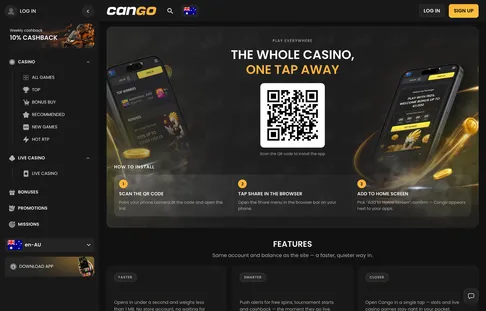
The casino’s install page shows the QR code and the Download iOS and Android buttons, which both lead to the home screen install rather than a store.

Cango mobile app install page with a QR code to add the casino to your home screen

Cango mobile: before you install

Before the cango mobile setup, check four settings on your handset. Most failed installs come from a phone in private mode or a browser that has not been updated, and players then tap around the menu looking for a button that is not there.

  • Update Safari on iOS or Chrome on Android to the latest version so the web app loads properly.
  • Leave Private mode in Safari or Incognito in Chrome, because browsers block home screen installs in private windows.
  • Keep a little free storage. The web app needs only a few megabytes, but a completely full phone can refuse to create the icon.
  • Sign in to your casino account in the browser before you add the icon, and keep any VPN switched off, since VPNs are banned under the site rules.

If the Share sheet on an Apple handset will not show the right option, our Cango iPhone app guide covers each iOS setting in detail. Signing in before you add the icon also means your A$ balance, active Missions and the 24/7 live chat are ready the first time you open the app.

Cango download: Chrome install steps

On Android, the cango download happens inside Chrome and builds a proper web app on the device. You do not touch Android security settings or look for APK files, which keeps the phone safer.

  1. Open Chrome and go to the casino lobby.
  2. Tap the three-dot menu in the top right corner.
  3. Tap Install app, or Add to Home screen if your phone uses that wording.
  4. Confirm with Install and wait a few seconds for the icon to appear in the app drawer and on the home screen.

Sometimes Android creates only a basic shortcut with a small Chrome badge on the icon, and the site still opens with an address bar. This usually happens when you tap Add to Home screen before the page has fully loaded. Delete that shortcut, clear the Chrome cache, reload the lobby, wait a few seconds and open the menu again until you see Install app.

Cango casino app: why there is no store app

A PWA updates itself each time you open the icon. When new BGaming or Thunderspin pokies arrive, or the Sunday reload of 50% up to A$150 goes live, you see it at once without downloading a large update file. It also takes a fraction of the storage a native app would need. Our editorial rating for mobile is 4.0 out of 5: the install is quick, though some players still expect a store listing.

Do not search the App Store or Google Play for this brand. Any app there with a similar name or logo is a copycat with no link to the casino. It will not connect to your A$ cashier or the welcome pack of 150% up to A$1,500 plus 300 free spins with code WP1, and it may put your personal details at risk. Stick to the browser install, and if anything looks unusual, open the 24/7 live chat inside the lobby for a reply in about two minutes.

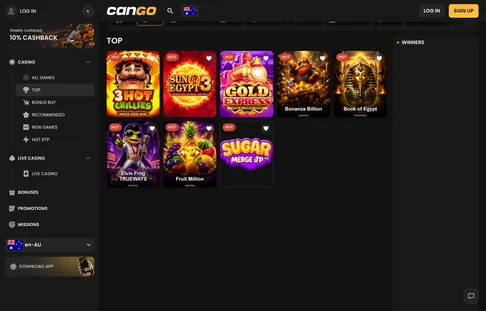
Inside the home screen app the Top category loads first, with the same pokies and live tables as the desktop lobby.

Cango Top pokies: 3 Hot Chillies, Sun of Egypt 3, Gold Express, Bonanza Billion and Book of Egypt

Cango app: still unsure?

  • Is there a specific Cango app I need to download?

    No file download from the app stores is needed. You install the Progressive Web App straight from Safari or Chrome, and it sits on your home screen like any other app.

  • How do I install the Cango casino app on my device?

    On iPhone, open the casino in Safari, tap the Share icon and select Add to Home Screen. On Android, open the site in Chrome, tap the menu button and choose Install app or Add to Home screen.

  • Is the Cango mobile experience different from playing on a computer?

    No, the app shows the same lobby categories, pokies and live tables as the desktop site, and the casino lists the same 3,000+ games. Your account, balance and promotions are shared across devices.

  • Can I manage my payments using the Cango mobile site?

    Yes, you can deposit and request withdrawals from your phone with Visa, Mastercard or crypto. Limits such as A$8,000 per week for cashouts are the same as on desktop.

  • Do I get the same welcome offer if I register via mobile?

    Yes, the welcome pack of 150% up to A$1,500 plus 300 free spins applies when you use code WP1. Your first deposit needs to be at least A$45 to activate it.